

L1 + L2 Guide
1. How to get x-product-api-key
- After purchasing the product, open the usage tab and there will be an
access token, which is the value of x-product-api-key. If "-" means it has not been initialized yet, press theRefreshbutton to initialize it. TheRefreshbutton is also used to reset theaccess token, at which point the old value will expire. - The
access tokenis shared by all products you purchase.
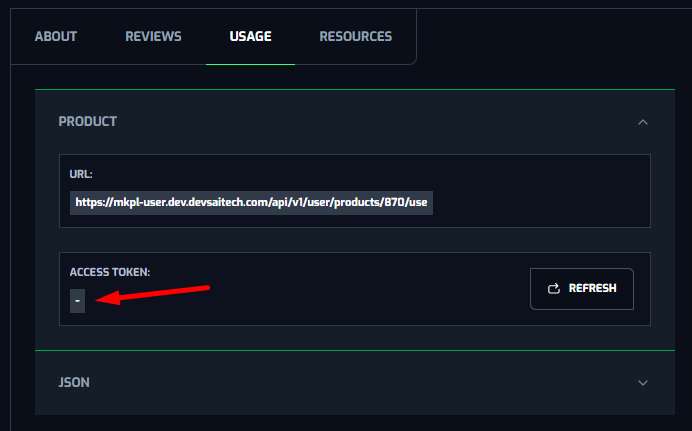
Figure 1.1: Access token isn’t existed
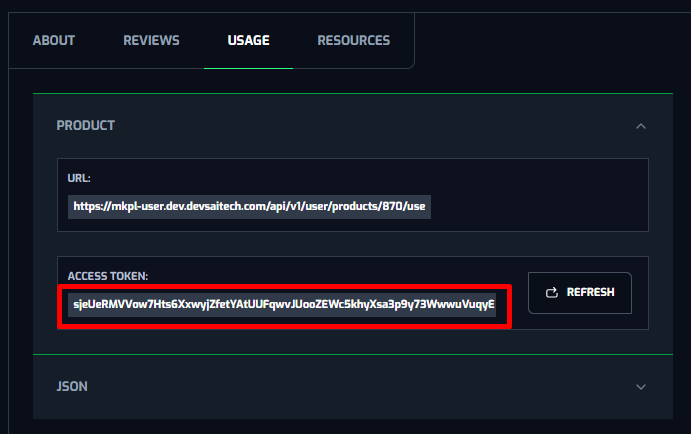
Figure 1.2: Access token is existed
2. Api Guide
2.1 Use product
This API enables users to pass payload from the API /call that the publisher defined.
- Endpoint
| Endpoint | /api/v1/user/products/{productId}/use |
|---|---|
| Method | POST |
- Header
| Name | Type | Required |
|---|---|---|
| x-product-api-key | String | Y |
- Path
| Name | Type | Description | Required |
|---|---|---|---|
| productId | Integer | Product ID | Y |
- Body
| Name | Type | Description | Required |
|---|---|---|---|
| method | String | Method name | Y |
| payload | Object | Payload of method | Y |
| callbackUrl | String | N |
- Response
| Name | Type | Description | Required |
|---|---|---|---|
| code | String | Error code. If code = "0", that mean successful | Y |
| message | String | Error message. If successful, the message is "success" | Y |
| data | Object | Y | |
| > taskId | UUID | If the method is asynchronous, this field will be returned | N |
| > status | String | If the method is asynchronous, this field will be returned and will always be "Pending". | N |
| > … (any fields) | If the method is an immediate response, the fields will be returned in the format the publisher has defined for this method in the usage tab | N |
Case 1: method is a task that needs to be processed asynchronously. These tasks are considered to take a considerable amount of time to process and cannot respond immediately in this api's response.
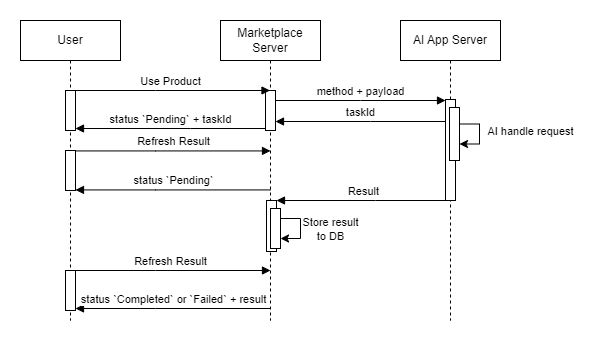
Figure 2.1.1: The method's flow of operations is asynchronous
Then, this Api will respond with a taskId and status: "Pending". We will be able to use this taskId to check the result of this request using the Refresh result api.
Refer to this example below with a Gif Generator app:
Example Request:
curl -X 'POST'
  '<host>/api/v1/user/products/53/use'
  -H 'accept: application/json'
  -H 'x-product-api-key: <api_key>'
  -H 'Content-Type: application/json'
  -d '{
  "method": "text2gif",
  "payload": {
    "prompt": "a cute girl is smiling",
    "height": 512,
    "width": 512
 }
}
'
Example response:
{
    "code": "0",
    "message": "success",
    "data": {
      "taskId": "f9f0f918-3a27-485a-a92f-11a63a2b3630",
      "status": "Pending",
    }
}
Method text2gif will create a gif file from the data received in the payload. This job will definitely take a long time to process. If the system waits for it to finish processing and return it to the user, it will create a bottleneck that clogs the system. Therefore, the system will return a taskId as the task identifier for this request as status: "Pending" to indicate that this task has been recorded and is in process.
Explain further why we save app usage history in 2 ways. There will be 2 api to get app usage results with normal methods (Refresh result, Get use app histories) and 2 api to get app usage results with chat methods (Refresh result, Get use app histories):
- With standard methods, the returned results will be updated to the request record previously saved in the database.
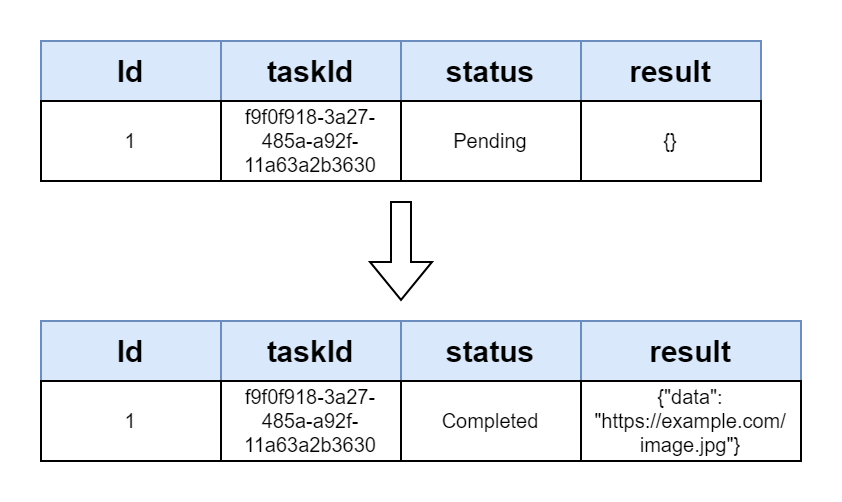
Figure 2.1.2: Data flow of standard method
- With chat methods, the returned results will be saved as a new record in the database. This will help display chat message results easily.
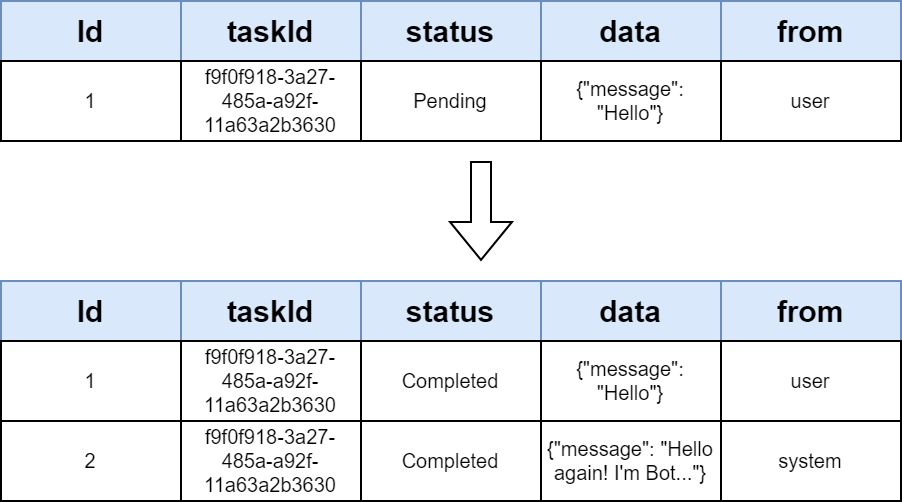
Figure 2.1.3: Data flow of chat method
Case 2: Method is a job that can be response immediately (for example: querying data from the database, or updating data into the database,...).
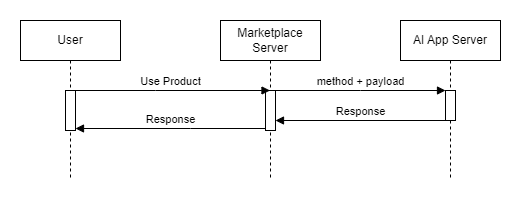
Figure 2.1.4: The method's flow of operations responds immediately
It is simply the opposite of case 1. Then all you want from this api will be in its response.
See the example below with the Role Play Chat Bot app
Example Request:
curl -X 'POST'
  '<host>/api/v1/user/products/324/use'
  -H 'accept: application/json'
  -H 'x-product-api-key: <api_key>'
  -H 'Content-Type: application/json'
  -d '{
  "method": "listCharacter",
  "payload": {
    "page": 1,
    "size": 10
  }
}
'
Example response:
{
  "code": "0",
  "message": "success",
  "data": {
    "dataType": "META_DATA",
    "data": {
      "characters": [
        {
          "id": "b3971500-f6b5-41b5-a80b-2d9bc9149323",
          "name": "Travel Guide",
          "baseBot": "gpt-3.5-turbo-0125",
          "image": "https://example.com/ecbdbffc-6051-4676-9828-1a15b0d4b187-1049e9d7-1d7a-4890-ad1d-0a94b1917220-1.jpg"
        },
        {
          "id": "335be667-69eb-4bd9-81a2-8f2e110b03d7",
          "name": "Bookworm Betty",
          "baseBot": "llama3-70b-8192",
          "image": "https://example.com/ecbdbffc-6051-4676-9828-1a15b0d4b187-1049e9d7-1d7a-4890-ad1d-0a94b1917220-1.jpg"
        }
      ],
      "total": 2,
      "page": 1,
      "size": 10,
      "pages": 1
    }
  }
}
Role Play Chat Bot app allows users to chat with AI bots, each bot will be able to answer one or more areas well that you need answered. The list of bots has been created by the publisher and stored in the database, so when we need to display the list of bots, we just need to query the database and return the list of available bots. This work is quite light and can be answered immediately in the response of this api. That's why it's called immediate response work. Method listCharacter is an example of such work.
In short, we will have 2 types of data that we can receive from the response of this api.
- Asynchronous: The response will always return
taskIdandstatus: "Pending". TheRefresh resultapi can be used to get the final result - Synchronous (immediate response): The response will return the data defined by the publisher. There is no taskId and no need to use the
Refresh resultapi to get the final result.
All Jobs (method + payload) will be defined and recorded by the publisher in the Request DTO, Response DTO section in the usage tab. They will also define which methods are synchronous and which methods are asynchronous (immediate response).
In cases where an error occurs:
- With error validating field
method,payload(invalid, missing): Response returns http error 400 (Bad Request)
Example request:
curl -X 'POST'
  '<host>/api/v1/user/products/324/use'
  -H 'accept: application/json'
  -H 'Authorization: Bearer <access_token>'
  -H 'Content-Type: application/json'
  -d '{
  "method": "listCharacter"
}
'
Example response:
{
  "statusCode": 400,
  "error": "BadRequestException",
  "message": {
    "payload": "payload should not be empty, payload must be an object"
  }
}- If it does not fall within the above two errors, the request will be forwarded to the AI server for processing. Then, if the input does not satisfy the AI app's validation, the system will still return the error http 400 (Bad Request) with
codeas the error code andmessageas an error returned by the AI app.
For example below with the Gif Generator App, the App has only one method, text2gif. Passing the method gif_gen is not supported, so AI Server returns the error "message": "unsupported method gif_gen" and "code": "GIF_403"
Example Request:
curl -X 'POST'
  '<host>/api/v1/user/products/53/use'
  -H 'accept: application/json'
  -H 'x-product-api-key: <api_key>'
  -H 'Content-Type: application/json'
  -d '{
  "method": "gif_gen",
  "payload": {
    "prompt": "a cute girl is smiling",
    "height": 512,
    "width": 512,
    "negativePrompt": ""
    }
}'
Example response:
{
  "code": "GIF_403",
  "statusCode": 400,
  "error": "BadRequestException",
  "message": "unsupported method gif_gen"
}
Regarding the callbackUrl field.
- For example, you are developing a Layer 2 app, you have previously purchased a Layer 1 app, and your Layer 2 app needs to use it.
- You will still need the Use Product, Refresh result or Refresh result for chat app api to be able to use the layer 1 app.
- However, this requires you to proactively retrieve the results (by using the Refresh result or Refresh result for chat app).
- To be able to receive results passively, use callbackUrl. Marketplace will proactively call it with the data that is the result of the Layer 1 app.
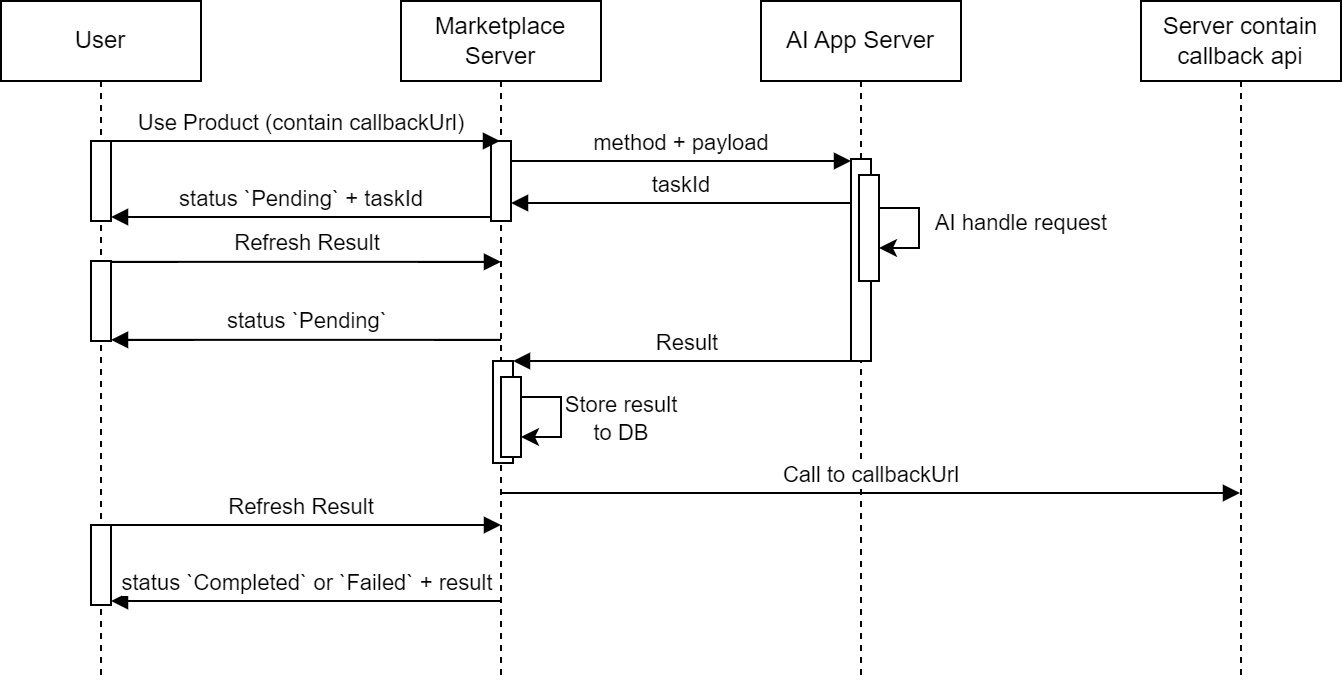
Figure 2.1.5: The method's flow of operations is asynchronous contain callbackUrl
With the callback api, there are some requirements users need to follow:
- Http method: POST
- The request header will contain
x-marketplace-token,please review before proceeding to ensure that the request is coming from Marketplace - If received, please respond with a status of 200
Note:
- If it fails or exceeds the timeout (10s), the system will try to call the api callback every 3s up to 3 times.
- The payload of the callback api will include the following fields:
| Name | Type | Description | Required |
|---|---|---|---|
| taskId | UUID | Task ID | Y |
| response | Object | Is the result returned from the corresponding method when using the Use product api. The format is defined by the publisher in the response DTO of each method in the usage tab | Y |
| errorCode | Object | Y | |
| > status | String | An error code | Y |
| > reason | String | Specifically describe the error that occurred | Y |
| extraType | String | Extra data type. Always is "chat_app" | N |
2.2 Refresh result
This api is used to receive the return results of the asynchronous method received from the response of the Use product api. Method has extra_type which is not chat_app
- Endpoint
| Endpoint | /api/v1/user/products/{productId}/refresh/{taskId} |
|---|---|
| Method | GET |
- Header
| Name | Type | Required |
|---|---|---|
| x-product-api-key | String | Y |
- Path
| Name | Type | Description | Required |
|---|---|---|---|
| productId | Integer | Product ID | Y |
| taskId | UUID | Task ID from the response of api Use product | Y |
- Response
| Name | Type | Description | Required |
|---|---|---|---|
| code | String | Error code. If code = "0", that mean successful | Y |
| message | String | Error message. If successful, the message is "success" | Y |
| data | Object | Y | |
| > status | String | One of the following values: "Pending", "Completed", "Failed" | Y |
| > result | Object | Is the result returned from the corresponding method when using the Use product api. The format is defined by the publisher in the response DTO of each method in the usage tab | N |
Continuing the example with Gif Generator above, below is an example result of method text2gif for the cases Pending, Completed, Failed
Example Request:
curl -X 'GET'
  '<host>/api/v1/user/products/53/refresh/800e5ab2-a267-4283-95a0-ddd7d095cc63'
  -H 'accept: application/json'
  -H 'x-product-api-key: <api_key>'
Example response for Pending:
{
  "code": "0",
  "message": "success",
  "data": {
    "status": "Pending"
  }
}
Example response for Success:
{
  "code": "0",
  "message": "success",
  "data": {
    "status": "Completed",
    "result": {
      "data": "https://example.com/GIFGenerator/5e7e1a54-386a-42d1-a25e-2b30a915e6b1.gif"
    }
  }
}
Example response for Failed:
{
  "code": "0",
  "message": "success",
  "data": {
    "result": {
       "error": [{"message": "Save file error"}]
    },
    "status": "Failed"
  }
}
2.3 Get use app histories
This API is used to get the usage history of asynchronous methods (methods that respond immediately will not be included here).
- Endpoint
| Field | Value |
|---|---|
| Endpoint | /api/v1/user/products/{productId}/usage-histories |
| Method | GET |
- Header
| Name | Type | Required |
|---|---|---|
x-product-api-key | String | Y |
- Path
| Name | Type | Description | Required |
|---|---|---|---|
productId | Integer | Product ID | Y |
- Param
| Name | Type | Description | Required |
|---|---|---|---|
page | Integer | Page number to retrieve. Default: 1 | N |
limit | Integer | Number of records per page. Default: 20. Max: 100. | N |
status | String | "Pending", "Completed", "Failed" | N |
sortBy | String | "id", "createdAt" | N |
sortDirection | String | "ASC", "DESC" | N |
- Response
| Name | Type | Description | Required |
|---|---|---|---|
code | String | Error code. "0" = success. | Y |
message | String | Response message. "success" if successful. | Y |
data | Array<Object> | Data records. | Y |
data.id | Integer | Unique record ID. | Y |
data.taskId | UUID | Task identifier. | Y |
data.result | Object | If status = "Completed", contains data from response DTO; if "Failed", includes error info. | N |
data.status | String | "Pending", "Completed", or "Failed". | Y |
data.dataType | String | "META_DATA", "S3_OBJECT", "HYBRID". | N |
data.createdAt | DateTime (ISO) | Timestamp when request was created. | Y |
data.input | Object | Method payload input. | Y |
meta | Object | Pagination metadata. | Y |
meta.itemCount | Integer | Items on this page. | Y |
meta.totalItems | Integer | Total items count. | Y |
meta.itemsPerPage | Integer | Items requested per page. | Y |
meta.totalPages | Integer | Total number of pages. | Y |
meta.currentPage | Integer | Current page number. | Y |
Example Request:
curl -X 'GET'
  '<host>/api/v1/user/products/53/usage-histories?page=1&limit=10'
  -H 'accept: application/json'
  -H 'x-product-api-key: <api_key>'
Example Response
{
  "code": "0",
  "message": "success",
  "data": [
    {
      "id": 1172,
      "productId": 53,
      "taskId": "800e5ab2-a267-4283-95a0-ddd7d095cc63",
      "status": "Completed",
      "dataType": "S3_OBJECT",
      "result": {
        "data": "https://example.com/GIFGenerator/5e7e1a54-386a-42d1-a25e-2b30a915e6b1.gif"
      },
      "input": {
        "seed": -1,
        "width": 512,
        "height": 512,
        "prompt": "a cat is running",
        "negativePrompt": "no"
      },
      "createdAt": "2024-06-25T09:49:46.654Z"
    },
    {
      "id": 1173,
      "productId": 53,
      "taskId": "a70560a7-94e5-483f-a49a-024c4409cd8b",
      "status": "Completed",
      "dataType": "S3_OBJECT",
      "result": {
        "data": "https://example.com/GIFGenerator/1ce47aa8-73e6-418c-8b01-f7fcc2c9533d.gif"
      },
      "input": {
        "seed": -1,
        "width": 512,
        "height": 512,
        "prompt": "a girl is smiling and there are trees",
        "negativePrompt": "non"
      },
      "createdAt": "2024-06-25T10:03:56.782Z"
    }
  ],
  "meta": {
    "itemsPerPage": 10,
    "totalItems": 2,
    "currentPage": 1,
    "totalPages": 1
  }
}
2.4 Refresh result for chat app
Like the refresh result api in section 2, this api is also used to receive the return results of the asynchronous method received from the response of the Use product api. But for Method there is extra_type which is chat_app
- Endpoint
| Endpoint | /api/v1/user/products/{productId}/chat-app/refresh/{taskId} |
|---|---|
| Method | GET |
- Header
| Name | Type | Required |
|---|---|---|
| x-product-api-key | String | Y |
- Path
| Name | Type | Description | Required |
|---|---|---|---|
| productId | Integer | Product ID | Y |
| taskId | UUID | Task ID from response of the api Use product | Y |
- Param
| Name | Type | Description | Required |
|---|---|---|---|
| from | String | Is one of the following values: "user", "system" | Y |
- Response
| Name | Type | Description | Required |
|---|---|---|---|
| code | String | Error code. If code = "0", that mean successful | Y |
| message | String | Error message. If successful, the message is "success" | Y |
| data | Object | Y | |
| > id | Integer | Unique id của bản ghi | Y |
| > taskId | UUID | Task ID | Y |
| > sessionId | String | Is the session ID of the app that manages chat by session | N |
| > from | String | Is one of the following values: "user", "system" | Y |
| > data | Object | If from is "user", this field is the data in the payload in the Use product api, otherwise if from is "system", this field is the data in the response according to the format the publisher defines in the usage tab | Y |
| > dataType | String | Is one of the following values: "META_DATA", "S3_OBJECT", "HYBRID" | N |
| > createdAt | Date time (ISO) | Time which request is created | Y |
Example Request:
curl -X 'GET'
'<host>/api/v1/user/products/324/chat-app/refresh/fd6db5ed-428d-4967-9aa0-cf9350330b31?from=system'
  -H 'accept: application/json'
  -H 'x-product-api-key: <api_key>'
Example Response:
{
  "code": "0",
  "message": "success",
  "data": {
    "id": 389,
    "taskId": "fd6db5ed-428d-4967-9aa0-cf9350330b31",
    "sessionId": "f16f1631-c540-4fec-bfda-9ea3a20a2cf9",
    "from": "system",
    "data": {
      "data": {
        "image": "",
        "answer": "Hello again! I'm Test, and I'm here to chat about travel and quality control. If you're up for it, let's chat about your bucket list destinations. What's the first place that comes to mind when you dream about your next adventure?"
      },
      "dataType": "META_DATA"
    },
    "dataType": "META_DATA",
    "createdAt": "2024-07-08T09:36:31.110Z"
  }
}
2.5 Get use app histories for chat app
This API is used to get the usage history of asynchronous methods (methods that respond immediately will not be included here) with chat applications (eg chat bots).
- Endpoint
| Endpoint | /api/v1/user/products/{productId}/chat-app/histories |
|---|---|
| Method | GET |
- Header
| Name | Type | Required |
|---|---|---|
| x-product-api-key | String | Y |
- Path
| Name | Type | Description | Required |
|---|---|---|---|
| productId | Integer | Product ID | Y |
- Param
| Name | Type | Description | Required |
|---|---|---|---|
| page | Integer | Page number to retrieve.If you provide invalid value the default page number will applied Default Value: 1 | N |
| limit | Integer | Number of records per page Default Value: 20 Max Value: 100 Note: If provided value is greater than max value, max value will be applied. | N |
| sessionId | String | Filter by sessionId | N |
| sortBy | String | Is one of the following values: "id", "createdAt" | N |
| sortDirection | String | Is one of the following values: "ASC", "DESC" | N |
- Response
| Name | Type | Description | Required |
|---|---|---|---|
| code | String | Error code. If code = "0", that mean successful | Y |
| message | String | Error message. If successful, the message is "success" | Y |
| data | Array<Object> | Y | |
| > id | Integer | Unique id của bản ghi | Y |
| > taskId | UUID | Task ID | Y |
| > sessionId | String | Is the session ID of the app that manages chat by session | N |
| > from | String | Is one of the following values: "user", "system" | Y |
| > data | Object | If from is "user", this field is the data in the payload in the Use product api, otherwise if from is "system", this field is the data in the response according to the format the publisher defines in the usage tab | Y |
| > dataType | String | Is one of the following values: "META_DATA", "S3_OBJECT", "HYBRID" | N |
| > createdAt | Date time (ISO) | Time which request is created | Y |
| meta | Object | Y | |
| > itemCount | Integer | The amount of items on this specific page | Y |
| > totalItems | Integer | The total amount of items | Y |
| > itemsPerPage | Integer | The amount of items that were requested per page | Y |
| > totalPages | Integer | The total amount of pages in this paginator | Y |
| > currentPage | Integer | The current page this paginator "points" to | Y |
Example Request:
curl -X 'GET'
'<host>/api/v1/user/products/324/chat-app/histories?page=1&limit=10'
  -H 'accept: application/json'
  -H 'x-product-api-key: <api_key>'
Example Response:
{
  "code": "0",
  "message": "success",
  "data": [
    {
      "id": 389,
      "taskId": "fd6db5ed-428d-4967-9aa0-cf9350330b31",
      "sessionId": "f16f1631-c540-4fec-bfda-9ea3a20a2cf9",
      "from": "system",
      "data": {
        "data": {
          "image": "",
          "answer": "Hello again! I'm Test, and I'm here to chat about travel and quality control. If you're up for it, let's chat about your bucket list destinations. What's the first place that comes to mind when you dream about your next adventure?"
        },
        "dataType": "META_DATA"
      },
      "dataType": "META_DATA",
      "createdAt": "2024-07-08T09:36:31.110Z"
    },
    {
      "id": 388,
      "taskId": "fd6db5ed-428d-4967-9aa0-cf9350330b31",
      "sessionId": "f16f1631-c540-4fec-bfda-9ea3a20a2cf9",
      "from": "user",
      "data": {
        "message": "hi",
        "sessionId": "f16f1631-c540-4fec-bfda-9ea3a20a2cf9",
        "characterId": "907f1d2f-bf96-4b8f-a77d-cdffe758749a"
      },
      "dataType": null,
      "createdAt": "2024-07-08T09:33:31.026Z"
    }
  ],
  "meta": {
    "itemsPerPage": 10,
    "totalItems": 2,
    "currentPage": 1,
    "totalPages": 1
  }
}