

AI Service Development Guide
1. Overview
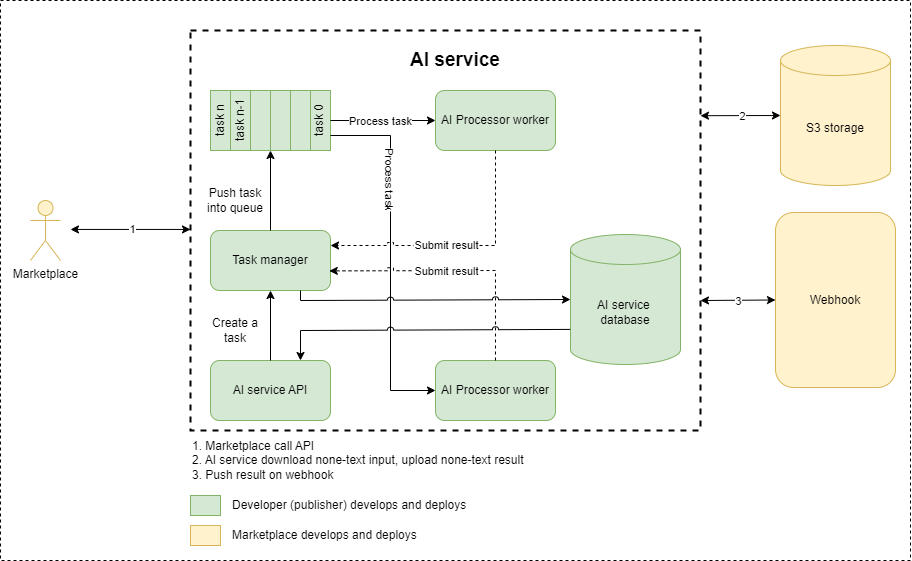
Figure 1.1: Architecture of the system overview
This document guides developers on the standards needed to develop an AI service for integration into the AI marketplace.The overall architecture is described in Figure 1:
- The AI service is an asynchronous service, therefore, developers need to design a queuing mechanism so that when a request is received, an immediate response is sent back to the client. In case there are no protocol-related errors or parameter violations, an AI task is created (associated with an ID) and pushed into the queue for processing. The AI service then responds to the client, indicating that the task has been created and is awaiting processing, with an errorCode indicating the "pending" status.
- Once the task is sent to the worker for processing, the task status changes from "pending" to "in progress". If at this point the client calls an API to retrieve the result based on the taskID, they will receive a response indicating that the task is currently in the "in progress" state.
- If the task is processed successfully, the task status will change to "success", and the result will be sent to the marketplace via a webhook. If the task encounters an error for any reason, it will be logged with an errorCode and a specific error description. In both cases of success or failure, information about the request is stored in the database for future analysis purposes.
- In case the marketplace does not find the result on the webhook, it can call an API to retrieve the result based on the taskID.
Developers can choose any technology to develop the AI service. However, they need to follow:
- The AI service will communicate with the marketplace via a RESTful API, which includes the following aspects:Endpoint, Number of Endpoints, Status Code, Header, Body Format, Error Code… (The following sections will provide detailed explanations for each item)
- All non-text data such as images, videos, audio files, etc., uploaded by users will be stored in S3. The client (Marketplace) will provide a shareable link for the AI service to download and process user requests. Therefore, developers need to specifically define the details in the body of the /call API.
- For all non-text results such as images, videos, audio files, etc. The AI service will store them in S3 and share a link via the API response for the marketplace to download the results.
- Developers need to follow a database schema to store the necessary information for use in the reporting process
- The AI service is packaged and run as a container.
2. Design API
| No | API | URL | Description | Remark |
|---|---|---|---|---|
| 1 | Create a request | /call | Create an AI task | Developers need to develop |
| 2 | Get result | /result | Get the result after process completed | Developers need to develop |
| 3 | Get statistics | /stats | Serving the purpose of statistical analysis. | Developers need to develop |
| 4 | Push result | N/A | Pushing the results back to the marketplace when the processing is completed | The marketplace will develop and deploy.Developers need to define the request body. |
CREATE REQUEST FLOW
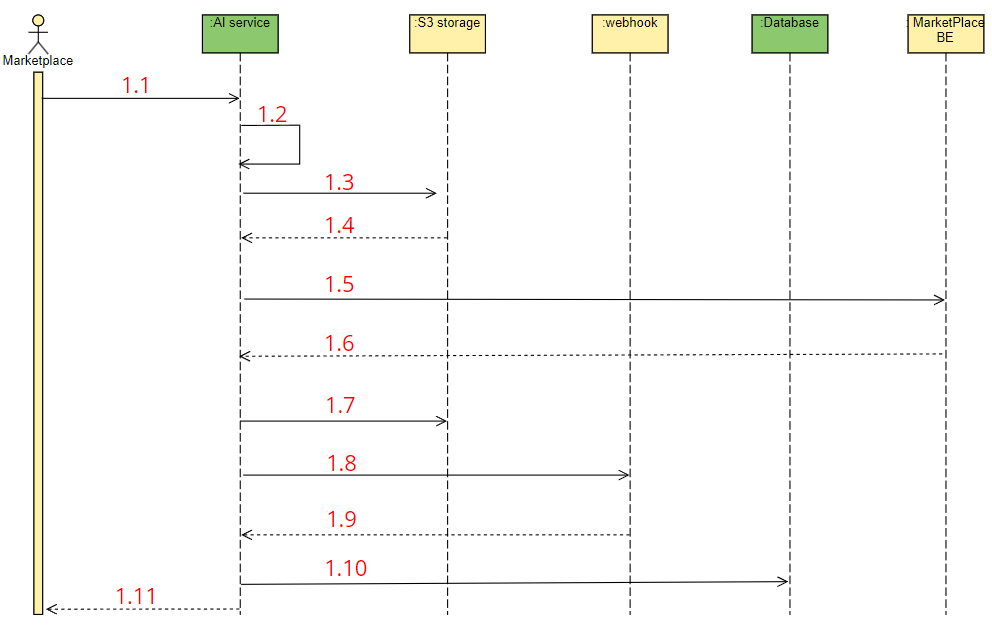
Figure 2.1: Call API sequence diagram
| No. | Description |
|---|---|
| 1.1 | The client (marketplace) creates a request. |
| 1.2 | The AI service checks the rules of the parameters. |
| 1.3 | The AI service requests to download an image from S3 if it is included in the body |
| 1.4 | Response from the S3 server. |
| 1.5 | The AI service request to get a presigned URL on S3 from MarketPlace BE |
| 1.6 | The MarketPlace BE return an presigned URL |
| 1.7 | Save non-text results to the S3 server based on presigned URL |
| 1.8 | Push the results back to the marketplace. |
| 1.9 | Receive response from the marketplace. |
| 1.10 | Save the request information to the database. |
| 1.11 | The AI service responds to the marketplace |
Information response rules
- If there are any protocol-related errors in the API, such as missing fields in the header or body, or incorrect data types defined, the AI service will return an HTTP status code indicating an error along with details.
- The AI service will validate the content of the body: if any field does not comply with the predefined rules, it will return an HTTP status code of 200 along with an error code defined by the developer (more details in section 2.5)
- The AI service will create a task and push it into a queue for processing by a worker. Simultaneously, it will immediately respond to the client with an HTTP status code of 200, providing a taskId that the client can use later to retrieve the results. This response will include an errorCode of "xxx_001" and a reason for "pending".
- Once the request has been processed, the results will be pushed back to the client (using the API provided by the client). This response will include an errorCode of "xxx_000" and a reason for "success".
- When a request is successfully processed, the request information will be saved in the database for future statistical purposes.
GET RESULT FLOW
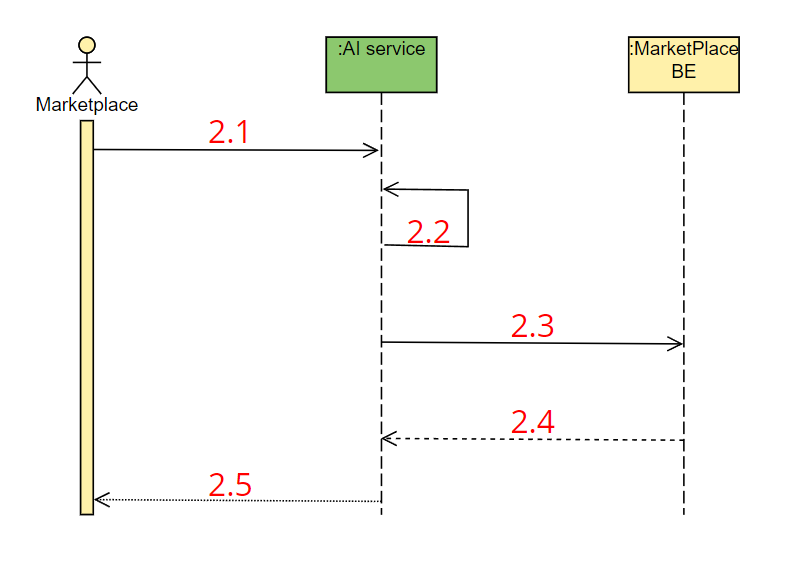
Figure 2.2: Get result API sequence diagram
| No. | Description |
|---|---|
| 2.1 | The client (marketplace) creates a request to retrieve the result |
| 2.2 | The AI service checks the rules of the parameters |
| 2.3 | AI service request a presinged S3 URL of an object from MarketPlace BE |
| 2.4 | MarketPlace BE response a presinged S3 URL |
| 2.5 | The AI service responds to the marketplace |
Information response rules
- If there are any protocol-related errors in the API, such as missing fields in the header or body, or incorrect data types defined, the AI service will return an HTTP status code indicating an error along with details.
- The AI service will validate the content of the body: if any field does not comply with the predefined rules, it will return an HTTP status code of 200 along with an error code defined by the developer (more details in section 2.5)
- The AI service returns the result with an HTTP_STATUS_CODE=200 along with an errorCode in the following cases:
- If the task is still in progress: errorCode=”xxx_002”, reason =”in progress”
- If the task successfully processed.: errorCode=”xxx_000”, reason =”success”
- If the task was not processed due to any specific error: Proper error code and error description.
GET STATISTICS FLOW
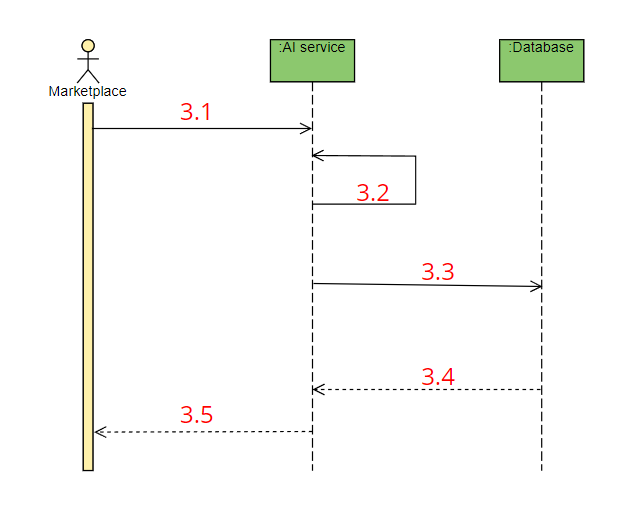
Figure 2.3: Get statistics API sequence diagram
Figure 2.3. Get statistics API sequence diagram
| No. | Description |
|---|---|
| 3.1 | The client (marketplace) creates a request to retrieve the result |
| 3.2 | The AI service checks the rules of the parameters |
| 3.3 | The AI service queries database |
| 3.4 | The AI service get data from database |
| 3.5 | The AI service responds to the marketplace |
Information response rules
- If there are any protocol-related errors in the API, such as missing fields in the header or body, or incorrect data types defined, the AI service will return an HTTP status code indicating an error along with details.
- The AI service will validate the content of the body: if any field does not comply with the predefined rules, it will return an HTTP status code of 200 along with an error code defined by the developer (more details in section 2.5)
- The AI service will return the statistical information on the number of successful or failed requests from the user
2.1 Call API
This API is designed for marketplaces to call and create a request to process an AI task
2.1.1 Endpoint
| Endpoint | /call |
|---|---|
| Method | POST |
2.1.2 Request
Header
| Json key | Type | Description | Required |
|---|---|---|---|
| x-marketplace-token | string | It is a token provided by the marketplace. | Y |
| x-request-id | string | A random string generated by the client (marketplace). | Y |
| x-user-id | string | Used for identification and tracing, statistics, and billing | Y |
| x-user-role | string | To identify user authorization for specific API requests Enum: [“admin”, “user”, “publisher”] | Y |
Body
| Json key | Type | Description | Required |
|---|---|---|---|
| method | string | If there are multiple sub-service options, the user will choose one of them. If there is only one service available, the name of that service will be used by default. | Y |
| payload | dict | Define the parameters required for the service. | Y |
| > Parameter-1 | define-by-developer | Describe the meaning and rules of the field. | N/A |
| > Parameter-2 | define-by-developer | Describe the meaning and rules of the field. | N/A |
Example data
# Body
{
  "method": "music_gen",
  "payload": {
    "promt": "energetic EDM",
    "duration": 5
  }
}
# CURL command
curl -X 'POST'
'host:port/call'
-H 'accept: application/json'
-H 'x-marketplace-token: token_value'
-H 'x-request-id: request_id_value'
-H 'x-user-id: user_id_value'
-H 'Content-Type: application/json'
-d '{
"method": "music_gen",
"payload": {
"promt": "energetic EDM",
"duration": 5
}
}'2.1.3 Response
| Json key | Type | Description | Required |
|---|---|---|---|
| requestId | string | A random string generated by the client (marketplace). | Y |
| traceId | string | A random string generated by AI service | Y |
| apiVersion | string | API version | Y |
| service | string | Service name | Y |
| datetime | string | The time at which the response is sent to the client (iso8601 format) | Y |
| isResponseImmediate | boolean | Indicates whether this is a synchronous or asynchronous API response True: synchronous False: asynchronous | Y |
| extraType | string | Represents the response of type AI For chatting AI app: extraType=chat_app | Y |
| response | object | Y | |
| > taskId | string | Used to retrieve the result after the process completes | Y |
| errorCode | object | The system error code is defined by the developer. (more detailed in 2.5 section) | Y |
| > status | string | An error code | Y |
| > reason | string | Specifically describe the error that occurred | Y |
Example data
# Successful Request Response
# taskId used for calling the /result API.
{
    "requestId": "test-request",
    "traceId": "0242d77c-6079-4214-b0e3-676c35afbe22",
    "apiVersion": "1.0.1",
    "service": "AudioCraft",
    "datetime": "2024-05-16T07:16:12.689022",
    "isResponseImmediate": "false",
    "extraType": "others",
    "response": {
        "taskId": "45e667c3-75ac-41c5-b4d9-538e05cc88d6",
    },
    "errorCode": {
        "status": "AC_001",
        "reason": "pending"
    }
}

# Error Response: Incorrect method used
# Only support audio_gen or music_gen. “music” is not supported
{
    "requestId": "",
    "traceId": "",
    "apiVersion": "1.0.1",
    "service": "AudioCraft",
    "datetime": "2024-05-16T07:16:12.689022",
    "isResponseImmediate": "false",
    "extraType": "others",
    "response": {
        "taskId": ""
    },
    "errorCode": {
        "status": "AC_403",
        "reason": "unsupported method music"
    }
}
2.2 Callback API
After an AI task is processed, an API callback is triggered to push the processing results back to the marketplace. The API callback is defined and deployed by the marketplace. The developer needs to define certain fields in the request body that align with the application's requirements.
2.2.1 Endpoint
| Endpoint | Marketplace provide |
|---|---|
| Method | POST |
2.2.2 Request
Header
| Json key | Type | Description | Required |
|---|---|---|---|
| x-marketplace-token | string | It is a token provided by the marketplace. | Y |
| x-request-id | string | A random string generated by the client (marketplace). | Y |
| x-user-id | string | Used for identification and tracing, statistics, and billing | Y |
| x-user-role | string | To identify user authorization for specific API requests Enum: [“admin”, “user”, “publisher”] | Y |
Body
| Json key | Type | Description | Required |
|---|---|---|---|
| apiVersion | string | API version | Y |
| service | string | Service name | Y |
| datetime | string | The time at which the response is sent to the client (iso8601 format) | Y |
| processDuration | float | Total processing time: the duration from when the data is pushed into the worker, excluding the time spent waiting in the queue for processing. | Y |
| taskId | string | Task ID, which corresponds to the taskId returned when calling the /call API. | Y |
| isResponseImmediate | boolean | Indicates whether this is a synchronous or asynchronous API response True: synchronous False: asynchronous | Y |
| extraType | string | Represents the response of type AI For chatting AI app: extraType=chat_app | |
| response | object | In this field, developers will define the fields that the returned results will have. | Y |
| > dataType | string | Type of response data META_DATA: If the result only contains metadata S3_OBJECT: If the result only contains a link to an S3 object. HYBRID: If the result contains both metadata and a link to an S3 object. | N/A |
| > field-1 | define-by-developer | Developers need to describe the details of the field | N/A |
| > field-2 | define-by-developer | Developers need to describe the details of the field | N/A |
| errorCode | object | The system error code is defined by the developer. (more detailed in 2.5 section) | Y |
| > status | string | An error code | Y |
| > reason | string | Specifically describe the error that occurred | Y |
Example data
# body
{
    "apiVersion": "1.0.1",
    "service": "AudioCraft",
    "datetime": "2024-05-16T07: 30: 08.592007",
    "processDuration": 5812.790632247925,
    "taskId": "15204bff-02cb-4b04-8ab0-f0dffd9c44fd",
    "isResponseImmediate": "false",
    "extraType": "others",
    "response": {
        "dataType": "S3_OBJECT",
        "data": "A shared link of music file saved on S3"
    },
    "errorCode": {
        "status": "AC_000",
        "reason": "success"
    }
}
# CURL example
curl -X POST
https://<The_market_place_webhook_endpoint>
-H "x-marketplace-token: token_value"
-H "x-request-id: request_id_value"
-H "x-user-id: user_id_value"
-H "Content-Type: application/json"
-d '{
"apiVersion": "1.0.1",
"service": "AudioCraft",
"datetime": "2024-05-16T07:30:08.592007",
"processDuration": 5812.790632247925,
"taskId": "15204bff-02cb-4b04-8ab0-f0dffd9c44fd",
"isResponseImmediate": "false",
"extraType": "others",
"response": {
"dataType": "S3_OBJECT",
"data": "A shared link of music file saved on S3"
},
"errorCode": {
"status": "AC_000",
"reason": "success"
}
}'
# Any errors encountered during processing will be described in the errorCode.2.2.3 Response
If the request is successful, it will return an HTTP status code 201.
2.3 Result API
This API is used by the marketplace to retrieve results based on the taskId returned in the /call API.
2.3.1 Endpoint
| Endpoint | /result |
|---|---|
| Method | POST |
2.3.2 Request
Header
| Json key | Type | Description | Required |
|---|---|---|---|
| x-marketplace-token | string | It is a token provided by the marketplace. | Y |
| x-user-id | string | Used for identification and tracing, statistics, and billing | Y |
| x-user-role | string | To identify user authorization for specific API requests Enum: [“admin”, “user”, “publisher”] | Y |
Body
| Json key | Type | Description | Required |
|---|---|---|---|
| taskId | string | Used to retrieve the result after the process completes. This is the taskId received from the /call API. | Y |
Example data
# body
{
  "taskId": "the_taskId_from_call_api_response"
}
# CURL example
curl -X 'POST'
'host:port/result'
-H 'accept: application/json'
-H 'x-marketplace-token: token_value'
-H 'x-user-id: user_id_value'
-H 'Content-Type: application/json'
-d '{
"taskId": "the_taskId_from_call_api_response"
}'2.3.3 Response
| Json key | Type | Description | Required |
|---|---|---|---|
| apiVersion | string | API version | Y |
| service | string | Service name | Y |
| datetime | string | The time at which the response is sent to the client (iso8601 format) | Y |
| processDuration | float | Total processing time: the duration from when the data is pushed into the worker, excluding the time spent waiting in the queue for processing. | Y |
| isResponseImmediate | boolean | Indicates whether this is a synchronous or asynchronous API response True: synchronous False: asynchronous | Y |
| response | object | In this field, developers will define the fields that the returned results will have. | Y |
| extraType | string | Represents the response of type AI For chatting AI app: extraType=chat_app | Y |
| > dataType | string | Type of response data META_DATA: If the result only contains metadata S3_OBJECT: If the result only contains a link to an S3 object. HYBRID: If the result contains both metadata and a link to an S3 object. | Y |
| > field-1 | define-by-developer | Developers need to describe the details of the field | N/A |
| > field-2 | define-by-developer | Developers need to describe the details of the field | N/A |
| errorCode | object | The system error code is defined by the developer. (more detailed in 2.5 section) | Y |
| > status | string | An error code | Y |
| > reason | string | Specifically describe the error that occurred | Y |
Example data
# Successful Request Response
{
    "apiVersion": "1.0.1",
    "service": "AudioCraft",
    "datetime": "2024-05-16T07:30:08.591039",
    "processDuration": 5812.790632247925,
    "isResponseImmediate": "false",
    "extraType": "others",
    "response": {
        "dataType": "S3_OBJECT",
        "data": ""
    },
    "errorCode": {
        "status": "AC_000",
        "reason": "success"
    }
}
# Response for a request with a non-existent taskId.
{
    "apiVersion": "1.0.1",
    "service": "AudioCraft",
    "datetime": "2024-05-16T07:30:08.591039",
    "processDuration": -1,
    "isResponseImmediate": "false",
    "extraType": "others",
    "response": {
        "dataType": "S3_OBJECT",
        "data": null
    },
    "errorCode": {
        "status": "AC_404",
        "reason": "taskId: a_random_taskid is not exist"
    }
}
2.4 Stats API
The API is designed to allow the marketplace to retrieve statistics about user requests.
2.4.1 Endpoint
| Endpoint | /stats |
|---|---|
| Method | POST |
2.4.2 Request
Header
| Json key | Type | Description | Required |
|---|---|---|---|
| x-marketplace-token | string | It is a token provided by the marketplace. | Y |
| x-request-id | string | A random string generated by the client (marketplace). | Y |
| x-user-id | string | Used for identification and tracing, statistics, and billing | Y |
| x-user-role | string | To identify user authorization for specific API requests Enum: [“admin”, “user”, “publisher”] | Y |
Body
| Json key | Type | Description | Required |
|---|---|---|---|
| N/A |
2.4.3 Response
| Json key | Type | Description | Required |
|---|---|---|---|
| apiVersion | string | API version | Y |
| service | string | Service name | Y |
| datetime | string | The time at which the response is sent to the client (iso8601 format) | Y |
| response | object | In this field, developers will define the fields that the returned results will have. | Y |
| > numRequestSuccess | int | The number of successfully completed requests by the user | Y |
| > numRequestFailed | int | The number of failed requests | Y |
| errorCode | object | The system error code is defined by the developer. (more detailed in 2.5 section) | Y |
| > status | string | An error code | Y |
| > reason | string | Specifically describe the error that occurred | Y |
2.5 Accession
| No. | Type | Value |
|---|---|---|
| 1 | x-marketplace-token | 1df239ef34d92aa8190b8086e89196ce41ce364190262ba71964e9f84112bc45 |
| 2 | Marketplace callback | https://marketplace-api-user.dev.devsaitech.com/api/v1/ai-connection/callback |
| 3 | S3 upload | https://marketplace-api-user.dev.devsaitech.com/docs#/AI%20resource/ai-app-presigned-upload-to-s3 |
| 4 | S3 download | https://marketplace-api-user.dev.devsaitech.com/docs#/AI%20resource/ai-app-get-presigned-download-to-s3 |
| 5 | S3 delete | https://marketplace-api-user.dev.devsaitech.com/docs#/AI%20resource/ai-app-delete-resource-s3 |
| 6 | x-product-api-key | UK24XC7qGpeUqPo69tL6fxyt4cSXvmwZ7sYFu4nH7mKjXZyHeyHXTMVtup48hSf |
2.5.1 Upload object
Get presigned
curl -X 'POST'
  'https://marketplace-api-user.dev.devsaitech.com/api/v1/ai-resource/presigned-upload'
  -H 'accept: application/json'
  -H 'x-publisher-key: UK24XC7qjGpeUqPo69tL6fxyt4cSXvmwZ7sYFu4nH7mKjXZyHeyHXTMVtup48hSf'
  -H 'Content-Type: application/json'
  -d '{
  "s3Key": "file_name.extension"
}'
Response
{
  "code": 0,
  "message": "success",
  "data": {
    "presignedUrl": "https://dev-aitech-marketplace-blob-storage.s3.ap-southeast-1.amazonaws.com/0029781988958338526/8a19ac42-7ace-463e-9e0f-a70f165964fb-file_name.extension?X-Amz-Algorithm=AWS4-HMAC-SHA256&X-Amz-Content-Sha256=UNSIGNED-PAYLOAD&X-Amz-Credential=AKIAVRUVRKXLOODYDPP7%2F20240620%2Fap-southeast-1%2Fs3%2Faws4_request&X-Amz-Date=20240620T102419Z&X-Amz-Expires=3600&X-Amz-Signature=ef59496065d0a9f147c9743037fb8849e559da3e19d74b03f509d11ebc709dba&X-Amz-SignedHeaders=host&x-id=PutObject",
    "key": "0029781988958338526/8a19ac42-7ace-463e-9e0f-a70f165964fb-file_name.extension"
  }
}
Use presignedUrl to create an uploading request. The object is stored as 0029781988958338526/8a19ac42-7ace-463e-9e0f-a70f165964fb-file_name.extension
2.5.2 Download object
Get presigned
curl -X 'GET'
  'https://marketplace-api-user.dev.devsaitech.com/api/v1/ai-resource/presigned-download?s3Key=0029781988958338526%2F8a19ac42-7ace-463e-9e0f-a70f165964fb-file_name.extension'
  -H 'accept: application/json'
  -H 'x-publisher-key: UK24XC7qjGpeUqPo69tL6fxyt4cSXvmwZ7sYFu4nH7mKjXZyHeyHXTMVtup48hSf'
Response
{
  "code": 0,
  "message": "success",
  "data": {
    "url": "https://dev-aitech-marketplace-blob-storage.s3.ap-southeast-1.amazonaws.com/0029781988958338526/8a19ac42-7ace-463e-9e0f-a70f165964fb-file_name.extension?X-Amz-Algorithm=AWS4-HMAC-SHA256&X-Amz-Content-Sha256=UNSIGNED-PAYLOAD&X-Amz-Credential=AKIAVRUVRKXLOODYDPP7%2F20240620%2Fap-southeast-1%2Fs3%2Faws4_request&X-Amz-Date=20240620T103611Z&X-Amz-Expires=3600&X-Amz-Signature=9442371e55e2c8ca35e14112595c8e008412f4434877b9fe739e79c026813cea&X-Amz-SignedHeaders=host&x-id=GetObject"
  }
}
Use url in response to download object
2.5.3 Delete object
curl -X 'POST'
  'https://marketplace-api-user.dev.devsaitech.com/api/v1/ai-resource/delete'
  -H 'accept: application/json'
  -H 'x-publisher-key: UK24XC7qjGpeUqPo69tL6fxyt4cSXvmwZ7sYFu4nH7mKjXZyHeyHXTMVtup48hSf'
  -H 'Content-Type: application/json'
  -d '{
  "s3Key": "0029781988958338526/8a19ac42-7ace-463e-9e0f-a70f165964fb-file_name.extension"
}'
2.6 Error Code
All errors related to the API protocol will return an HTTP status code. However, system-related errors such as exceeding size limits or incorrect parameter content will be returned based on the defined error codes below.
Note that: The error code represents a group of errors, so developers need to describe specific errors in the "reason" field to facilitate easier debugging in case of errors.
XXX: Write the abbreviation of the service name. For example FaceDetection will be FD
| No. | Error code | Description |
|---|---|---|
| 1 | XXX_000 | Indicates the task was processed successfully. Ready to get result |
| 2 | XXX_001 | Indicates the task is waiting to be processed |
| 3 | XXX_002 | Indicates that the task is in progress |
| 4 | XXX_400 | Indicates invalid request, maybe some fields are empty, invalid |
| 5 | XXX_401 | Indicates that the request exceeds the allowed resources: the server only allows generating 5 minutes of audio but the client requests 6 minutes |
| 6 | XXX_402 | Indicates that the client does not have permission to use the API |
| 7 | XXX_403 | Indicates unsupported errors: service not supported, image format not supported, video format not supported... |
| 8 | XXX_404 | Indicates not found errors: for example, taskId not found |
| 9 | XXX_500 | |
| 10 | XXX_501 | Indicates an error from the server |
| 11 | XXX_502 | Indicates error from rabbit: Connection failed for example |
| 12 | XXX_503 | Indicates error from Redis: Connection failed for example |
| 13 | XXX_504 | Indicates error from S3: Connection failed for example |
3. Design database
The database is used to store information about requests to facilitate reporting (via the /stats API).
Stack: Developers can use databases like MongoDB, MySQL, or others for this purpose. However, the required fields of information to be met are as shown in the table below.
| NO. | Field | Type | Description | Required |
|---|---|---|---|---|
| 1 | user_id | string | The ID of the user who created the request. | Y |
| 2 | task_id | string | This is the taskId returned by the AI service in the /call API. | Y |
| 3 | status | Boolean | The status of the request: whether it was successful or failed. | Y |
| 4 | processing_duration | float | The total processing time of the task, excluding the time spent in the queue. | Y |
| 5 | datetime | DateTime | The timestamp when the information is inserted into the database. | Y |