

AI Marketplace Docs
Architecture overview
1.1 Overview
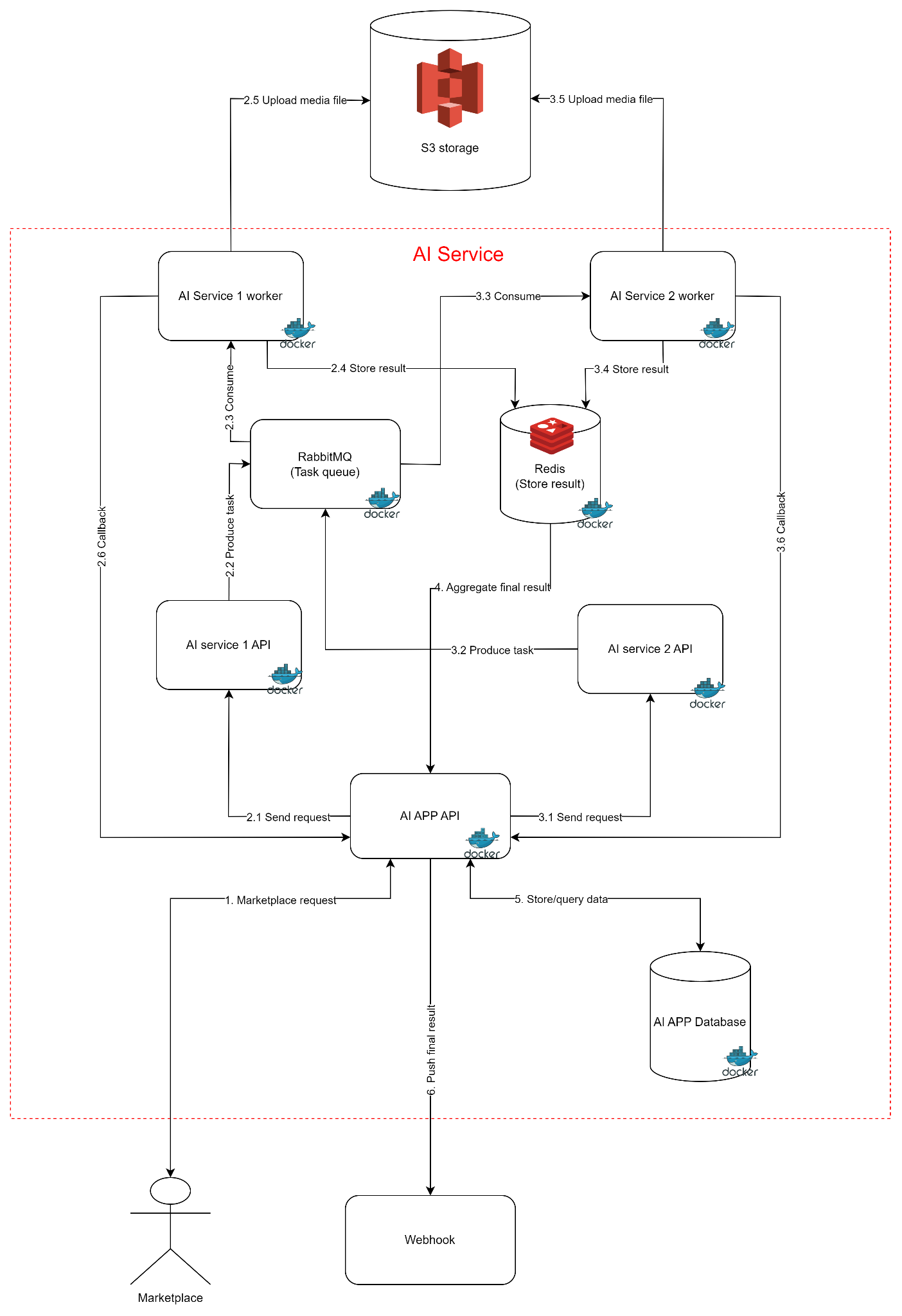
Figure 1: AI app architecture overview
Table 1. Describe component in AI service architecture
| No. | Category | Component | Description | AI scope | Note |
|---|---|---|---|---|---|
| 1 | Client | Client | AI marketplace | N | |
| 2 | Client callback | Client callback | Get results after a task has been completed | N | |
| 3 | AI App API | AI App API | Receive request from client (marketplace) and process. Manage stages to solve a specific task. | Y | |
| 4 | Storage | S3 storage | Store media data (Including request data from the client and AI result data). Services send media file metadata to each other | N | |
| 5 | AI APP Database | Store user request information for statistics | Y | ||
| 6 | Redis | Store temporary results of tasks and requests: Will be deleted after a period of time | Y | ||
| 7 | Queue | RabbitMQ | Store pending tasks | Y | |
| 8 | AI service 1 | AI service 1 API | Receive requests to process tasks and push tasks into the queue | Y | |
| 9 | AI service worker | Pull the task in the queue and process it | Y | ||
| 10 | AI service 2 | AI service 2 API | Receive requests to process tasks and push tasks into the queue | Optional | Whether or not depends on the AI problem |
| 11 | AI service worker | Pull the task in the queue and process it | Optional | Whether or not depends on the AI problem |
With a basic AI problem: AI service will require a minimum of 6 components (docker container). The number of components will increase when the AI problem is complex and needs to be divided into multiple stages for processing
Examples for simple AI problems: Person detection, face detection, face embedding, face searching… For each problem like this, 6 components need to be developed and deployed
For more complex problems such as face recognition, it needs to be processed through many steps: face detection, then face embedding and finally searching. There are up to 3 stages in this problem, so there will be up to 3 AI services. Therefore, the number of components that need to be developed and deployed is 10 (add 2 components for each added service)
1.2 AudioCraft service
Audio Craft is an AI service that generates sounds and music based on user descriptions. It is divided into 2 sub-services that operate independently of each other. The AudioGen is used for generating sounds such as: car horns, cat meowing... and the MusicGen specializes in generating music (with melody). AudioCraft's system design is shown in the figure 2
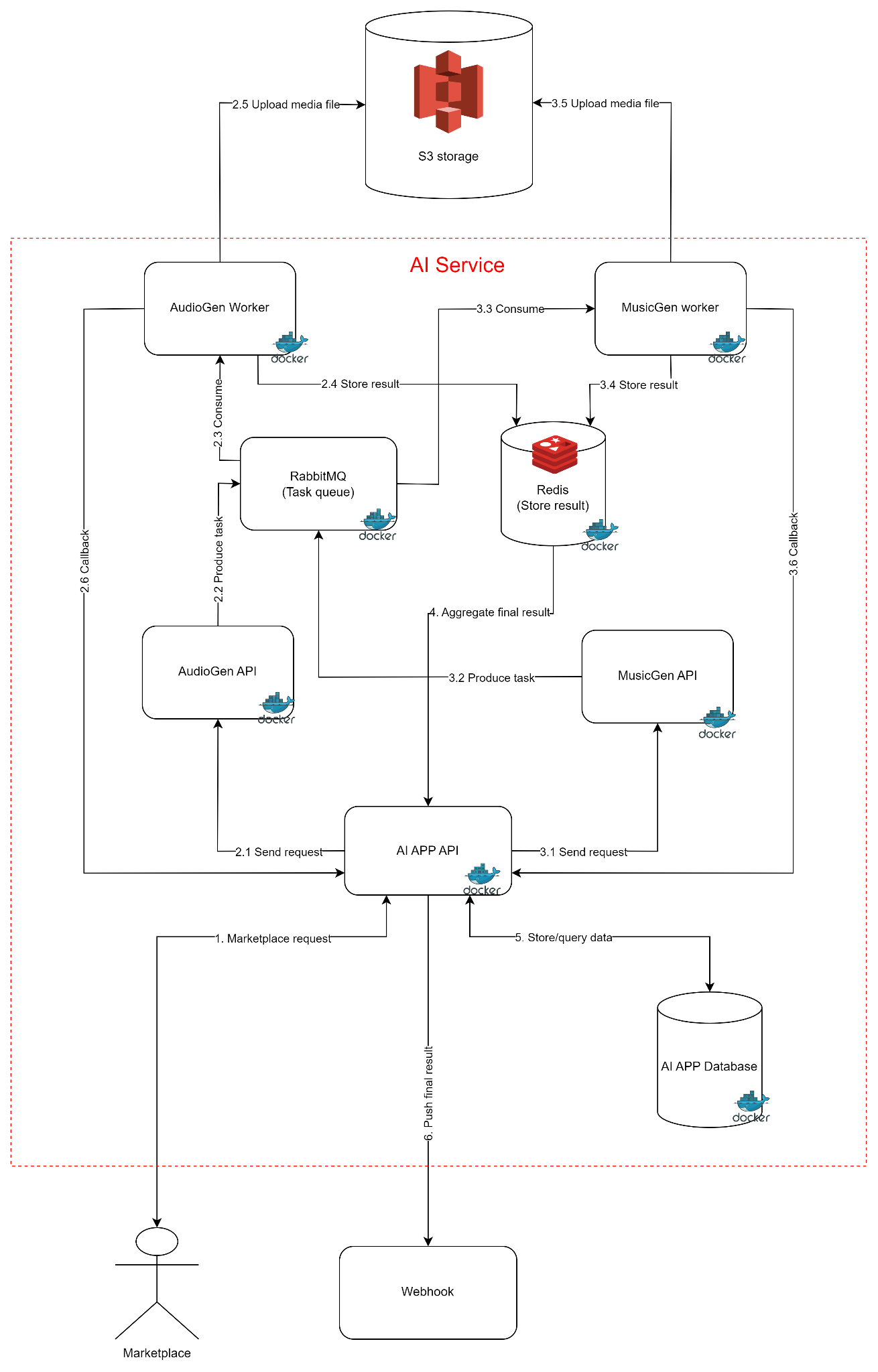
Figure 2: AudioCraft architecture
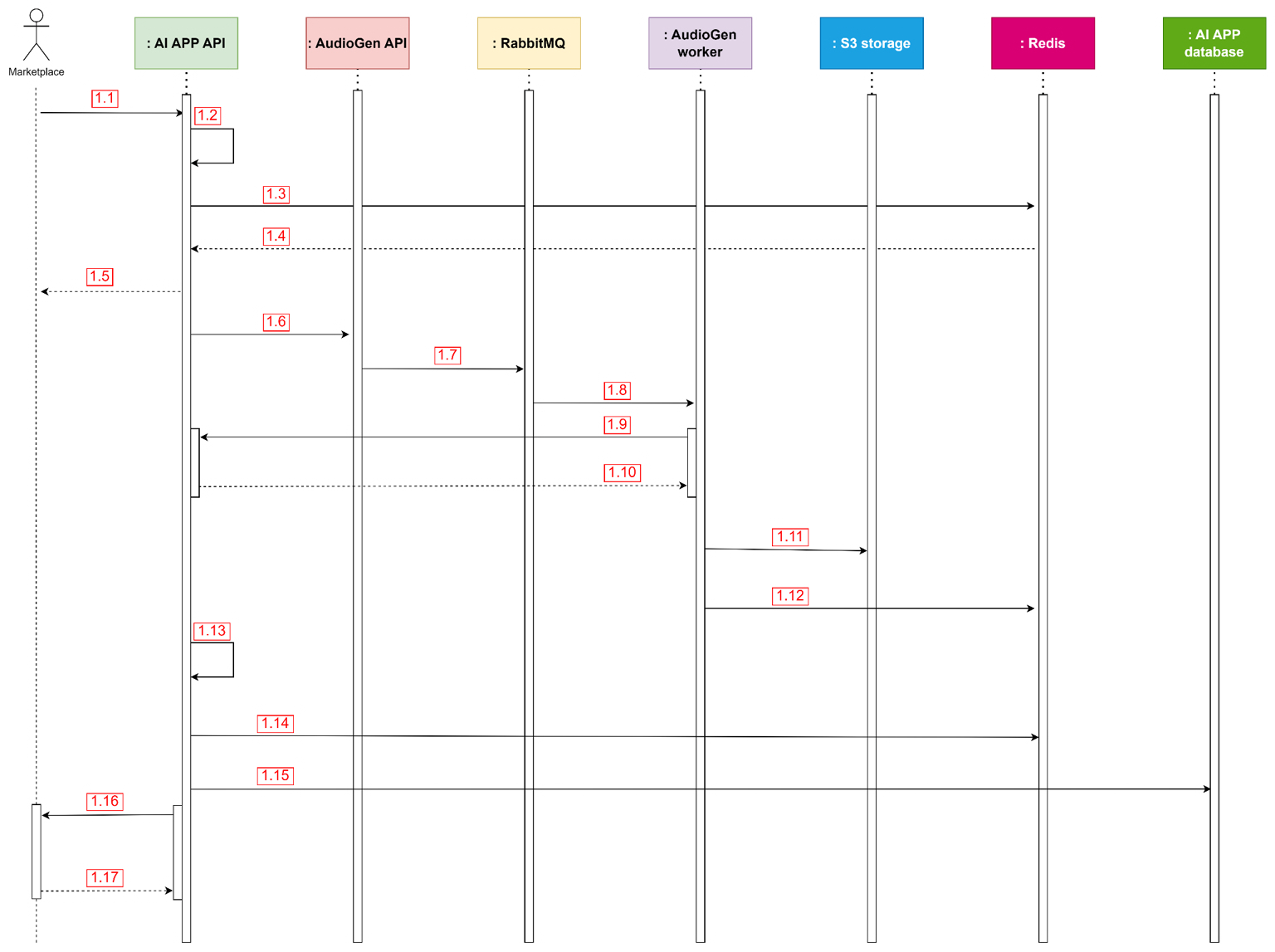
Figure 3: Call API sequence diagram
Table 2. Description of sequence diagram and executable code in source code
| No. | Description | Executable code | Note |
|---|---|---|---|
| 1.1 | Client create a request to AI service | Module: app_api.app_api Class:AudioCraftAppAPI Function:call Line number: 198 | |
| 1.2 | Service validation | Module: app_api.app_api Class:AudioCraftAppAPI Function:call Line number: 205 | |
| 1.3 | Create workflow with workflow_id (task_id) | Module: app_api.app_api Class:AudioCraftAppAPI Function:call: Line number: 223 | |
| 1.4 | Response to client status of request | Module: app_api.app_api Class:AudioCraftAppAPI Function:call: Line number: 227 | |
| 1.5 | Sen request to AudioGen API | Module: app_api.app_api Class:AudioCraftWorkFlow Function:trigger_request_text2audio: Line number: 132 | |
| 1.6 | Create a task and push to task queue | Module: audio_core_api.audio_core_api Class:AudioGenerationAPI Function:api_generate_audio Line number: 66 | |
| 1.7 | AudioGen worker pull task and perform | Module: audio_core_api.audio_gen_worker Class:AudioGenerationSerivce Function:run Line number: 28 | |
| 1.8 | Execute callback | Module: audio_core_api.audio_gen_worker Class:AudioGenerationSerivceCallback Function:run Line number: 104 | |
| 1.9 | Store media file on S3 storage | Module: audio_core_api.audio_gen_worker Class:AudioGenerationSerivce Function:run Line number: 54 | |
| 1.10 | Store temporary result on Redis | Module: audio_core_api.audio_gen_worker Class:AudioGenerationSerivce Function:run Line number: 74 | |
| 1.11 | Aggregate final result | Module: app_api.app_api Class:AudioCraftWorkFlow Function:trigger_text2audio_callback Line number: 145 | |
| 1.12 | Store final result on Redis | Module: app_api.app_api Class:AudioCraftWorkFlow Function:trigger_text2audio_callback Line number: 147 | |
| 1.13 | Store request information in database | Module: app_api.app_api Class:AudioCraftWorkFlow Function:process_result Line number: 103 | |
| 1.14 | Execute client callback | Module: app_api.app_api Class:AudioCraftWorkFlow Function:process_result Line number: 94 |
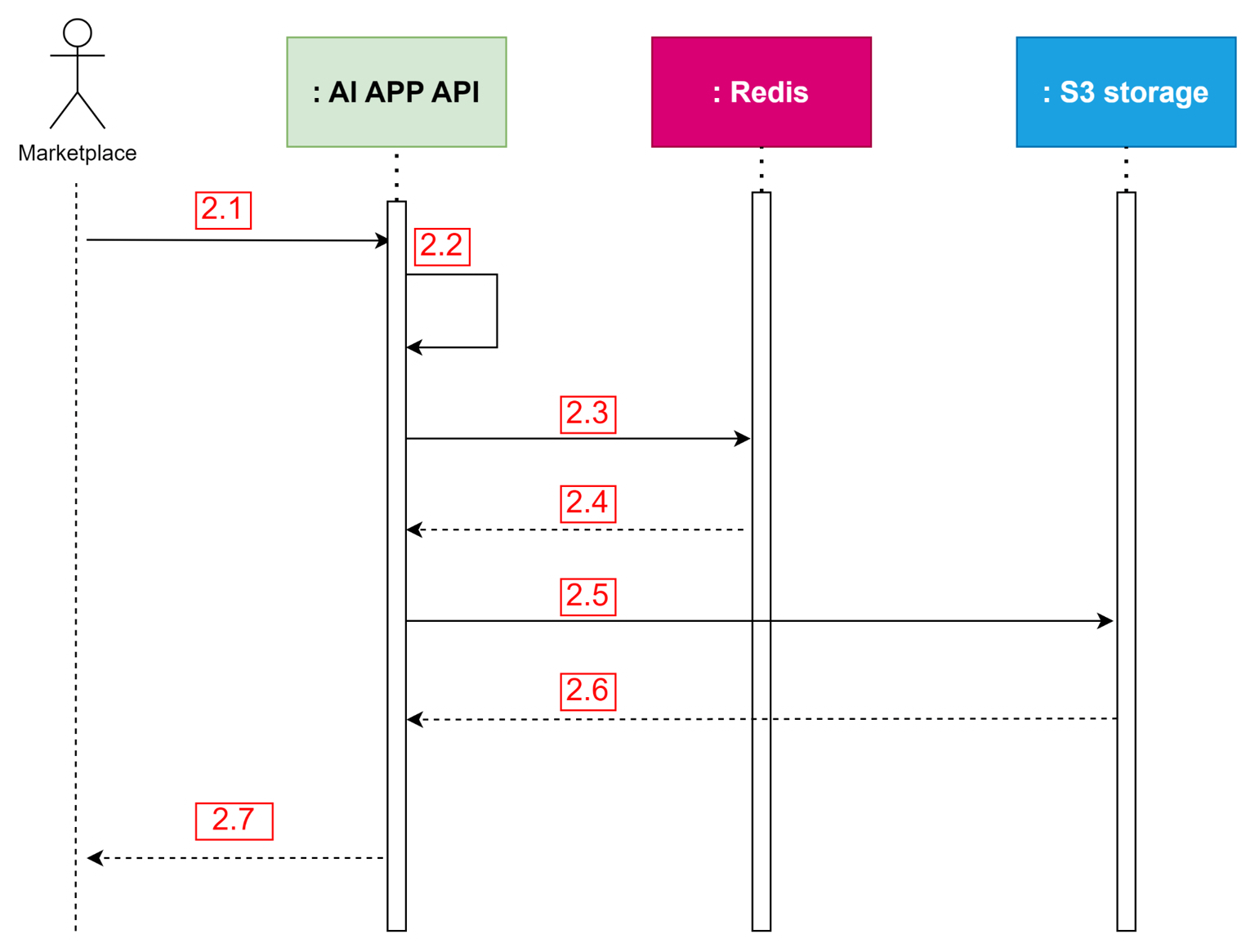
Figure 4: Result API sequence diagram
Table 3. Description of sequence diagram and executable code in source code
| No. | Description | Executable code | Note |
|---|---|---|---|
| 2.1 | Client create a request to to get result based on task_id | Module: app_api.app_api Class:AudioCraftAppAPI Function:result Line number: 235 | |
| 2.2 | Service validation | Module: app_api.app_api Class:AudioCraftAppAPI Function:result Line number: 238 | |
| 2.3 | Retrieve workflow based on task_id (workflow uuid) | Module: app_api.app_api Class:AudioCraftAppAPI Function:result Line number: 258 | |
| 2.4 | Get URL in S3 | Module: app_api.app_api Class:AudioCraftAppAPI Function:result Line number: 266 | |
| 2.5 | Response result to client | Module: app_api.app_api Class:AudioCraftAppAPI Function:result Line number: 288 |
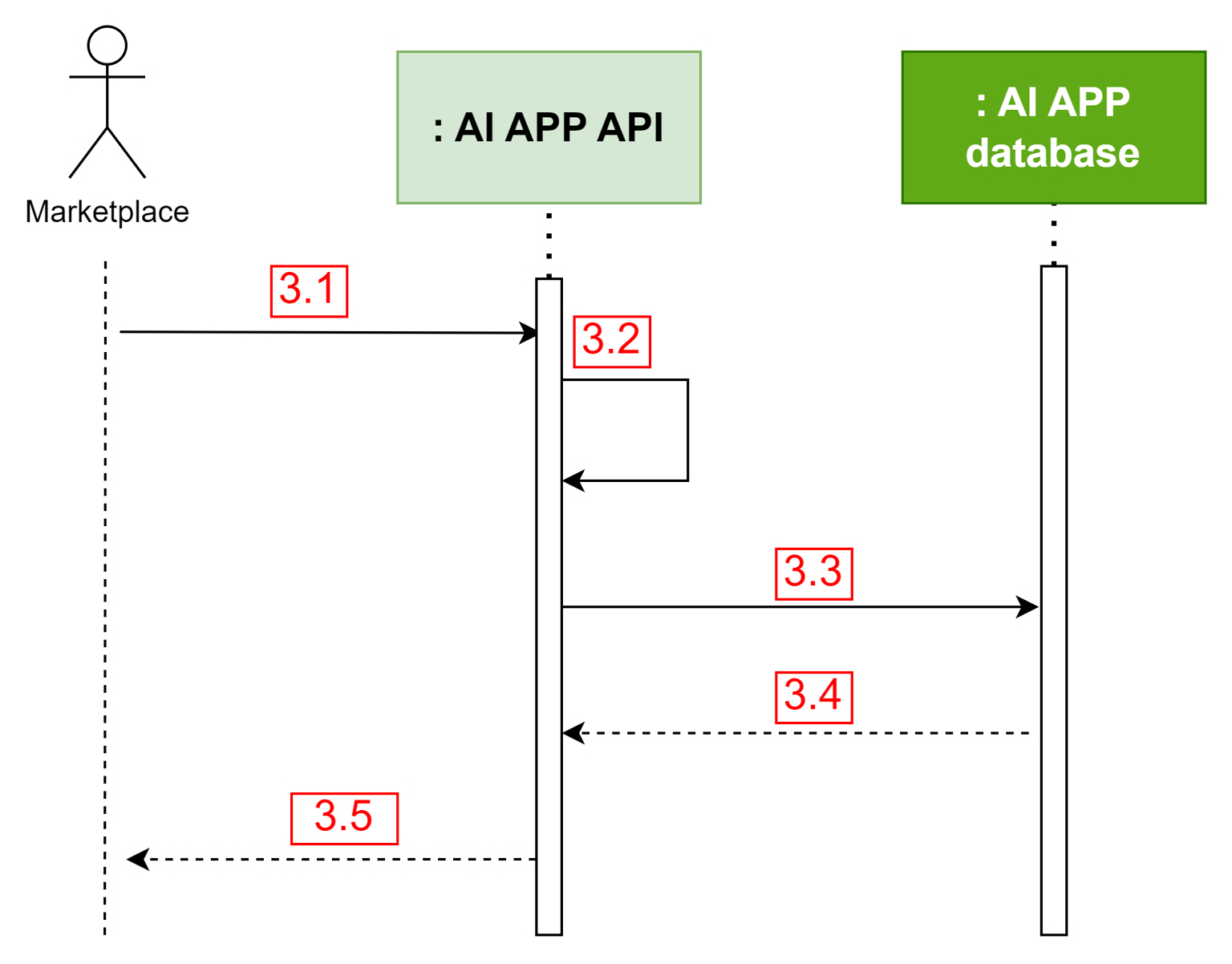
Figure 5: Stats API sequence diagram
Table 4. Description of sequence diagram and executable code in source code
| No. | Description | Executable code | Note |
|---|---|---|---|
| 3.1 | Client creates a request to get statistical information | Module: aimarket_core_app_base.app Class: BaseAppAPI Function: stats Line number: 112 | |
| 3.2 | Service validation | Module: aimarket_core_app_base.app Class: BaseAppAPI Function: stats Line number: 112 | |
| 3.3 | Query data in database | Module: aimarket_core_app_base.app Class: BaseAppAPI Function: get_results_by_user_id Line number: 117 | |
| 3.4 | Response result to client | Module: aimarket_core_app_base.app Class: BaseAppAPI Function: stats Line number: 120 |
2. Package
2.1 Docker image
| No. | Component | Docker image name | Type |
|---|---|---|---|
| 1 | RabbitMQ | rabbitmq:3.8.14-management-alpine | Opensource |
| 2 | Redis | redis:6-alpine | |
| 3 | AI APP database | postgres:12-alpine | |
| 4 | AI APP API | your_registry_url/your_repo:version | Self-build |
| 5 | AudioGen API | ||
| 6 | AudioGen worker | ||
| 7 | MusicGen API | ||
| 8 | MusicGen worker |
2.2 Build docker image
Step 1: Clone the project
$ git clone https://github.com/DopikAI-Labs/aimarket-audiocraft-service.git
# The Git repository URL may change when delivering the source code to the customer. Carefully check the provided URL.
Step 2: Update submodule
$ cd aimarket-audiocraft-service
$ submodule update --init --recursive
If the source code provided is a compressed file, skip the above two steps
Step 3: Build image
Edit script: ./scripts/build_dockerfile.sh
Update the ECR, and version in ./version.json
#!/bin/bash

ECR="your_registry_url/your_repo"
TAG=$(jq -r '.api_version' version.json)
SERVICE="audio_craft"
IMAGE_NAME="${ECR}:${SERVICE}_${TAG}"

docker build -t $IMAGE_NAME -f dockerfile .
echo image $IMAGE_NAME is built$ cd aimarket-audiocraft-serviceBuild image
$ chmod +x ./scripts/build_dockerfile.sh
$ ./scripts/build_dockerfile.sh
If no errors occur, the terminal will show
$ your_registry_url/your_repo:audio_craft_0.1.4 is builtStep 4: Push image to registry
Step 4.1: Login to registry
Install awscli
$ pip install awscli
# or pip3 install awscli
# If you're using a virtual environment created with venv or conda, make sure it's activated before proceeding.
Configure AWS information
$ aws configure
# AWS Access Key ID [None]: Enter your access key ID
# AWS Secret Access Key [None]: Enter your secret  access key
# Default region name [None]: Enter region
# Default output format [None]: Can skip it
For the next time, there is no need to do the above 2 steps in step 4.1 section
Get the password
$ aws ecr get-login-password
# The terminal will generate a string (password)
Login repository: Make sure repository has been created
$ docker login -u AWS -p <<generated_string_from_above_command>> <<repository_URL_in_ECR>>Step 4.2: Push docker image
Push docker image
$ docker push docker_image_name:tag3. Deployment
3.1 Infrastructure requirements
| No. | Category | Item | Required |
|---|---|---|---|
| 1 | Hardware | CPU | |
| 2 | CPU arch | x64 | |
| 3 | RAM | 16G | |
| 4 | NVIDIA GPU | 12GB | |
| 5 | Storage (root) | 32GB | |
| 6 | Software | OS | Ubuntu 20.04 or later |
| 7 | Docker | 26.x.x or later | |
| 8 | Docker-compose | 1.29.x or later |
3.2 Deployment procedure
Step 1: Pull docker image
Step 1.1 Login registry
Do the same as step 4.1 in the package section
Step 1.2 Pull image
$ docker pull docker_image_name:tag
# docker_image_name:tag => It is an pushed image in the package section
Step 2: Deploy service
Make a deployment directory
$ cd ../../../deployment_space_dirctory_path
$ mkdir audio_craft
$ cd audio_craft
$ mkdir v0.1.4
$ cd v0.1.4
# v0.1.4: Change to match the version to be deployed
Create a docker-compose.yml file
$ vim docker-compose.yml
# Copy ./aimarket-audiocraft-service/docker-compose.yml and past to it
Create .env file
$ vim .env
# Copy ./aimarket-audiocraft-service/.env and past to it
With the .env file, all environment variables highlighted in red need to be updated.
| No. | Group | Variable | Default value | Required update |
|---|---|---|---|---|
| 1 | AI Service | APP_API_PORT | 8007 | Y |
| 2 | AUDIO_GEN_PORT | 8081 | Optional | |
| 3 | MUSIC_GEN_PORT | 8082 | Optional | |
| 4 | MAX_DURATION | 30 | Optional | |
| 5 | MAX_PROMPT_LEN | 100 | Optional | |
| 6 | CACHE_MODEL_DIR | ../model_hub | NO | |
| 7 | TRANSFORMERS_CACHE | /model_hub | NO | |
| 8 | AUDIOCRAFT_CACHE_DIR | /model_hub | NO | |
| 9 | AUDIO_GEN_MODEL | facebook/audiogen-medium | Optional | |
| 10 | MUSIC_GEN_MODEL | facebook/musicgen-small | Optional | |
| 11 | API_VERSION | 0.1.4 | Optional | |
| 12 | API_NAME | AudioCraft | Optional | |
| 13 | Database | POSTGRES_USER | aimarketAdmin | Optional |
| 14 | POSTGRES_PASSWORD | aimarketPassword | Optional | |
| 15 | POSTGRES_DB | aimarketDb | Optional | |
| 16 | S3 storage | AWS_REGION_NAME | <<SECRET>> | Y |
| 17 | AWS_ACCESS_KEY | <<SECRET>> | Y | |
| 18 | AWS_SECRET_KEY | <<SECRET>> | Y | |
| 19 | RabbitMQ | RABBITMQ_HOST | aimarket_rabbitmq | Optional |
| 20 | RABBITMQ_VHOST | aiqrbroker | Optional | |
| 21 | RABBITMQ_USER | aiqradmin | Optional | |
| 22 | RABBITMQ_PASS | aiqrPassword | Optional | |
| 23 | RABBITMQ_PORT | 5672 | Optional | |
| 24 | RABBITMQ_UI_PORT | 15672 | Optional | |
| 25 | Redis | REDIS_HOST | aimarket_redis | Optional |
| 26 | REDIS_PORT | 6379 | Optional | |
| 27 | REDIS_DB_NAME | 0 | Optional | |
| 28 | MarketPlace | MARKETPLACE_TOKEN | <<SECRET>> | Y |
| 29 | MARKETPLACE_CALLBACK | <<SECRET>> | Y |
Run service
# make sure you are in the same directory with docker-compose.yml file
$ docker-compose up
Check the terminal to determine if any errors occurred. If not, Ctrl + C to stop running service
Run service in detached mode
$ docker-compose up -d